Billing
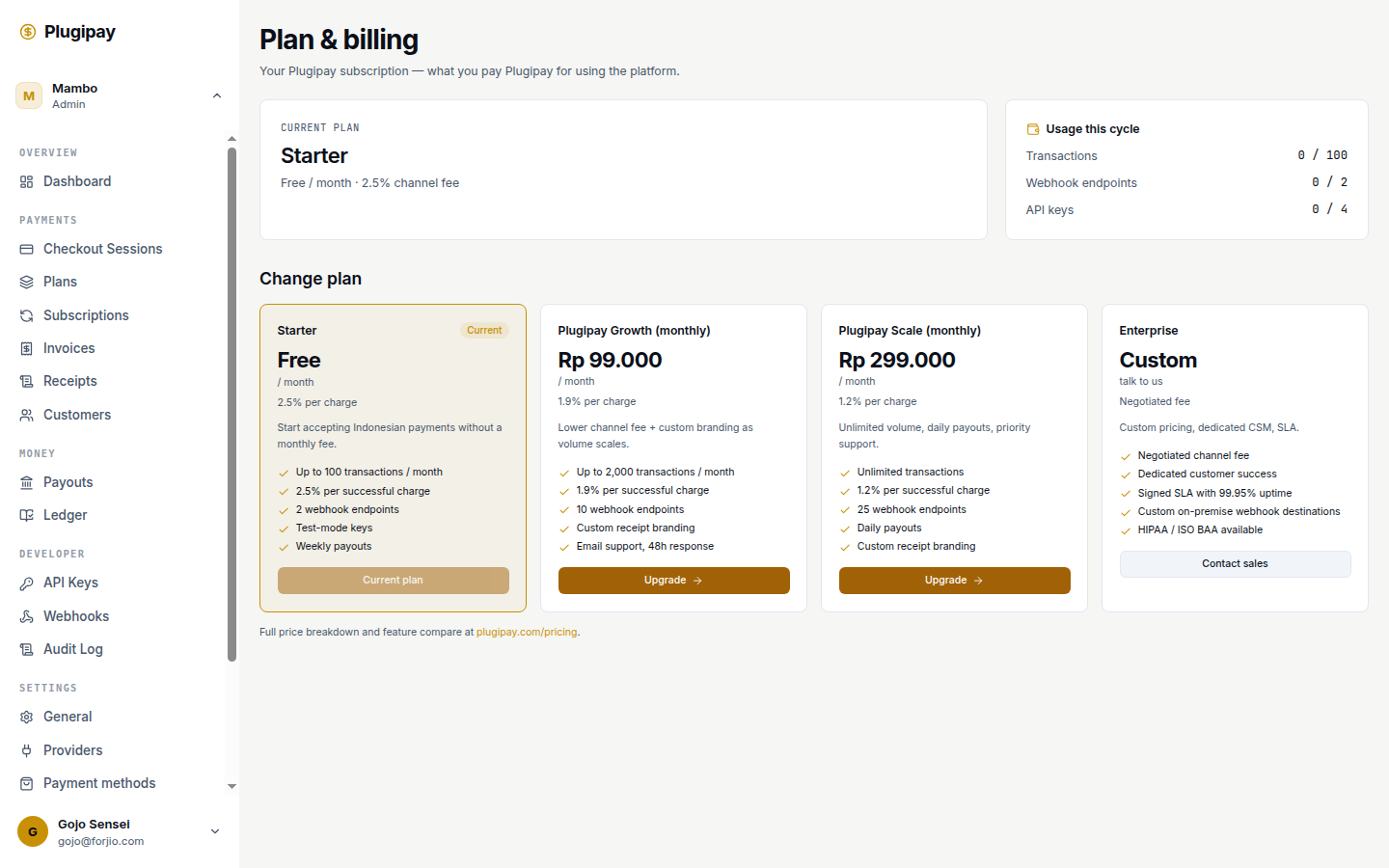
The Billing page at plugipay.com/dashboard/billing is where you manage what Plugipay charges you — not what you charge your customers. It's our service fee for running checkout, settling payments, hosting webhooks, and storing your data.
It's a different surface from Invoices (the ones you issue to your customers) and Receipts (customer-facing proof of payment). One is your revenue, the other is your cost of goods.
Whose bill is this? Anything under Billing is Plugipay billing your workspace. Anything under Invoices is your workspace billing your customers.
What the page shows
Four blocks:
- Current plan — the plan you're on (Starter, Growth, Scale, Enterprise, or Forjio-internal) plus headline rate.
- Usage this cycle — live counters for what affects your bill: transactions, webhook endpoints, API keys, and (on metered plans) payment volume.
- Payment method on file — the card or bank account Plugipay charges on the 1st.
- Invoice history — one row per past month with status, amount, and download link.
A Change plan section sits below if you're eligible to switch.
Modes and what we charge for
Plugipay has three commercial modes — see Pricing model for the full shape. The billing page renders whichever applies:
- Managed mode — we handle the upstream provider relationship. Fees come off each settled payment, so most months the invoice from us is small or zero.
- Bring-your-own-provider (BYO) — you connect your own Xendit, Midtrans, or PayPal. Your provider charges you directly; Plugipay invoices a small platform fee per successful payment.
- Partner mode — for integrators reselling Plugipay (e.g., a Storlaunch store running checkout through us). Volume is invoiced monthly to the integrator, not the underlying merchant.
If you see a "Forjio-internal workspace" banner, fees are waived — you don't owe us anything.
Estimated usage and projection
The Usage this cycle card is live — it updates as transactions settle. Alongside the raw counters, it shows a projected month-end bill based on your run-rate: today's usage divided by elapsed days, times days in the month. Projections at the start of a month are noisier than at the end.
Read the projection like a weather forecast. Accurate enough to plan around, but the real invoice is generated from your actual usage on the 1st.
Invoice history
Below the usage card is a table of past invoices, newest first: number, period, amount, status (Paid, Pending, Failed, Refunded), download link.
Each invoice is itemised. Click in and you'll see line items by category — per-transaction fees, channel fees on partner-routed volume, platform fees for BYO, plus volume credits or annual-contract adjustments. Refunds appear as negative-line credits. Numbering is sequential per workspace with the year prefix; numbers never repeat, never skip.
Payment method on file
The Payment method card shows the card or bank account Plugipay charges automatically — usually a Visa/Mastercard, or for larger Indonesian businesses a BCA, Mandiri, or BNI direct debit.
Click Update payment method to change it. That opens Plugipay's own hosted customer portal — yes, we use Plugipay to bill Plugipay customers. Authorise the new method there, return to the dashboard, and the next invoice draws from it.
We never store raw card details. The card is tokenised by our upstream provider; the dashboard only shows brand and last four.
Eating our own cooking. The "Update payment method" button drops you into a Plugipay-hosted checkout session, the same way your customers update their card with you. If anything feels off about the flow, please tell us — we want to know first.
Downloading PDFs
Each invoice row has a Download PDF action. The PDF is a finalised, immutable document with your business details on the customer side, our details on the issuer side, the tax breakdown, and a payment reference — accounting-ready.
The Export dropdown also produces a CSV of invoices over a date range. Useful at year-end.
Taxes
Indonesian-registered workspaces are charged PPN (VAT) on top of the service fee. We adjust automatically when the government rate changes; the invoice itemises the tax line.
International workspaces are charged by billing country: VAT in the EU and UK, GST in Australia, Singapore, and New Zealand, and so on. If you're tax-exempt or registered for reverse-charge, add your tax ID in Settings → Business → Tax profile — future invoices reflect it.
Tax ID changes are not retroactive. Updating your tax registration only affects invoices issued after the change. We can't reissue past invoices with a different tax treatment.
Volume discounts
Once monthly processed volume crosses certain thresholds, your effective rate drops. On Starter and Growth these aren't auto-applied — a banner suggests an upgrade after three months above the next threshold. On Scale and Enterprise the discount is built into the plan. For very large merchants, Enterprise pricing is negotiated — Contact sales opens an email to our team.
Switching plans
The Change plan section lets you upgrade or downgrade. Click the target plan, confirm payment authorisation in the hosted Plugipay checkout, and you're returned with the new plan active.
- Upgrades take effect immediately. The current period is prorated — higher rate from the moment of switch, with the unused portion of the old plan credited.
- Downgrades take effect at the end of the current billing period. No prorated refund — that prevents downgrade-then-cancel abuse.
- Managed ↔ BYO also takes effect at the period boundary, since the underlying provider relationship has to roll over cleanly.
If you cancel, a banner shows the date you'll move to Starter. You can rescind the cancellation any time before that.
Late payments
If a charge declines, the invoice goes into Past due and we retry:
- Day 1 — immediate retry on the decline.
- Day 3 — second retry plus email reminder to the billing contact.
- Day 7 — third retry, second reminder, warning banner for all team members.
- Day 14 — final retry. Workspace enters grace mode: existing payments still settle, but new API keys, webhooks, and team invites are blocked.
- Day 30 — suspended. New payments stop accepting; existing subscriptions pause until you settle.
We never silently delete data for non-payment — a suspended workspace can be restored any time by paying the outstanding invoice. After 90 days suspended we email about closure; nothing happens automatically.
Annual contracts
If your volume is predictable, an annual contract trades commitment for a lower per-transaction rate. You commit to a minimum monthly volume; we discount accordingly. Under-commit and next month's rate adjusts; over-commit and the discount applies to the overage too.
Works well for subscriptions and steady marketplaces, poorly for spiky businesses like ticketing or seasonal retail. To request, use Contact sales or email hello@plugipay.com.
Common pitfalls
- Mixing test-mode payments into billing math. Test-mode transactions don't count toward usage or invoices — they're free forever. If the projection looks wrong, check the test/live toggle in the top bar.
- Updating tax registration and expecting old invoices to recalculate. They won't. New tax profile applies to new invoices only.
- Assuming a managed-mode invoice will be large. Managed-mode fees come off each payment as it settles — the month-end invoice usually just contains adjustments and volume credits.
- Letting the billing contact email bounce. Past-due reminders go to that address. Confirm it under Settings → Team.
- Cancelling a plan to "pause" billing. Cancelling drops you to Starter at period end; it doesn't pause anything. To reduce spend temporarily, downgrade rather than cancel.
Next
- Pricing model — the shape of what we charge in each mode.
- Invoices — the invoices you issue to your customers (different page, different direction).
- Receipts — customer-facing proof of payment.
- Team — where to set the billing contact email.