Workspaces
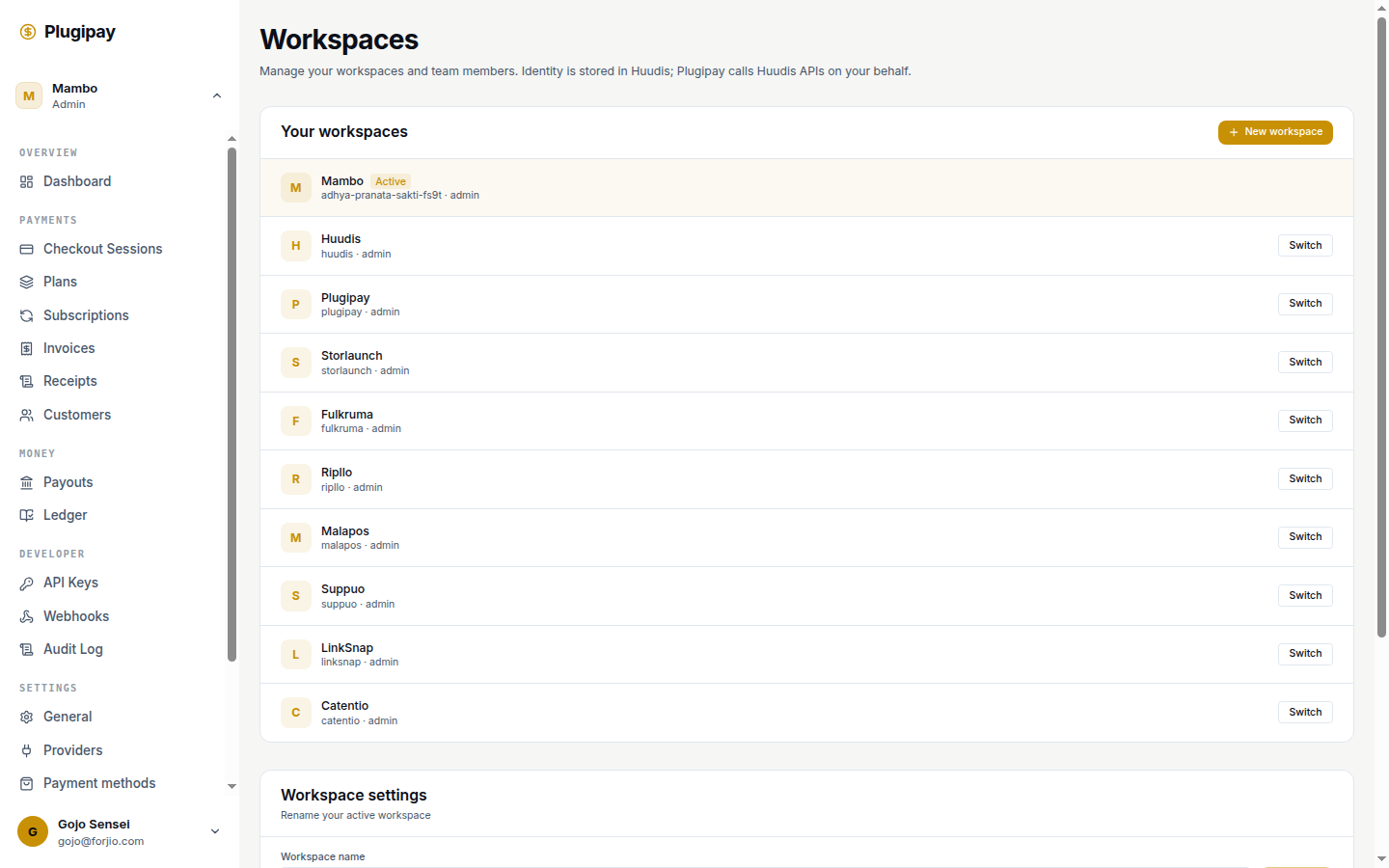
A workspace is the top-level tenant boundary in Plugipay. Every customer, payment, refund, API key, webhook endpoint, and team member lives inside one workspace, and nothing crosses the line between them.
Mental model. If you've used Stripe, a workspace is the equivalent of a Stripe account. It owns its own data, keys, and billing record. You can hold several under one login.
What lives inside a workspace
Every workspace owns its own copy of the Plugipay object graph: customers, payments, refunds, invoices, checkout sessions, subscriptions, API keys, webhook endpoints, templates, payment-method configuration, team members, and the billing record we charge for fees.
Workspace IDs look like ws_01H… — a typed prefix plus a ULID.
Creating a workspace
Two ways in: the workspace switcher (top-left chip → + New workspace), or the dedicated page at /dashboard/workspaces → New workspace.
Name is the only required field. Plugipay derives the slug, sets a default currency and region from your Huudis profile, and creates the workspace immediately. You become the Owner. New workspaces start in test mode with no live payment method — to accept real money, complete the activation checklist.
Workspace settings
Open the Workspace settings card at the top of /dashboard/workspaces:
| Field | What it does |
|---|---|
| Name | Display name. Shown in the switcher, on receipts, in audit log entries. Renameable. |
| Slug | URL-safe handle (acme-prod). Used in hosted checkout URLs and deep-links. Renameable, but old slugs 410. |
| Default currency | What new checkout sessions and plans default to. Doesn't restrict what you can charge in. |
| Region | Data residency zone (Jakarta or Singapore today) and default provider routing. Set at creation; contact support to move. |
| Timezone | The clock reports, exports, and scheduled invoices run on. Defaults to your Huudis profile. |
Region is sticky. Region determines where your data physically lives. Changing it requires a backend migration we run on request — the portal hides the field for a reason. Pick the right one at creation.
Members and roles
A workspace has a team. Each member has exactly one role:
| Role | Can do |
|---|---|
| Owner | Everything, including transfer ownership, archive, and manage billing. Exactly one per workspace. |
| Admin | Everything except the Owner-only actions. Multiple Admins allowed. |
| Member | Day-to-day operations: payments, refunds, webhooks, customers. Can't manage team or API keys. |
| Read-only | View everything, change nothing. Useful for accountants, auditors, support staff. |
Roles are workspace-scoped. The same Huudis identity can be Owner in one workspace, Admin in another, and Read-only in a third.
Inviting members
From the Team members card, click Invite. Enter an email and pick a role. Plugipay sends an invitation; the recipient signs into Huudis (or signs up if they don't have a Forjio identity yet) and the workspace appears in their switcher. Invitations expire after 7 days.
Identity is Huudis-owned. Invites are addressed by email, but the underlying member record is keyed on the Huudis user ID. If someone changes their primary email after accepting, their membership follows the identity, not the address.
Removing members
Owners and Admins can remove any member with a lower role. You can't remove the Owner — transfer ownership first.
Switching active workspace
The chip in the top-left of every dashboard page names your active workspace. Click to switch. Mechanics:
- Cookie-persisted. We write your choice to a
plugipay_active_workspacecookie (30-day lifetime). Resumes on next page load. - Full reload. Switching reloads the page so every server-rendered component re-resolves under the new workspace scope. In-flight edits are lost — finish what you're editing first.
- Per-product. Each Forjio product tracks its own active workspace. Switching in Plugipay doesn't affect Storlaunch.
Multi-workspace patterns
Three reasons to run more than one workspace:
- Test vs live separation — some merchants want test data fully separated on top of Plugipay's per-workspace test/live toggle. Spin up
acme-stagingalongsideacme. - Multiple brands — two storefronts under one legal entity that look like separate businesses to customers (different receipt branding, payout schedule, team).
- Environment isolation — production, staging, and development as three workspaces with fully isolated data and webhook endpoints.
Workspaces are free. We bill on volume, not count.
Billing isolation
Each workspace owns its own billing record — the payout account, fee schedule (managed-mode rate vs BYO-mode flat fee), invoice address, and past Plugipay invoices under Settings → Billing. A user who owns two workspaces has two billing records.
Cross-workspace data: deliberately none
No API call, portal page, or view returns data from more than one workspace. Search doesn't span them, webhooks fire per workspace signed by that workspace's secret, and API keys authenticate exactly one workspace.
If you want consolidated reporting across brands, roll it up yourself from each workspace's API. "View across workspaces" features are the single most common source of cross-tenant data leaks in multi-tenant SaaS — we'd rather not own that risk.
Archiving a workspace
The Owner can archive from Settings → Workspace → Danger zone → Archive workspace. Confirm by typing the slug. What happens:
- Live mode is disabled immediately. New payments, subscriptions, and checkout sessions reject with
workspace_archived. - Subscriptions are canceled at period end — existing customers keep service until their current cycle finishes.
- Webhooks stop firing. Pending deliveries drop after a 24-hour grace.
- API keys are revoked; calls return
401. - The workspace disappears from the switcher for all members except the Owner, who keeps a read-only view.
- Data is retained for 90 days, then purged. Within that window, restore from Settings → Workspaces → Archived with one click.
After 90 days the workspace is permanently deleted. We can't recover it.
Export first. Before you archive, pull a CSV of customers and a JSON export of payments from Reports → Exports. Once the 90-day window closes, the data is gone.
Transferring ownership
The Owner can hand off to any Admin or Member. From Settings → Workspace → Danger zone → Transfer ownership, pick the new Owner and re-enter your Huudis password. They get an email and have 7 days to accept.
On acceptance the role flip is atomic — new Owner becomes Owner, you become Admin, the billing relationship transfers, the audit log records both sides. Unaccepted transfers expire after 7 days. Either side can cancel during the pending window.
Common pitfalls
One identity, one membership per workspace
A single Huudis user can't be a member of the same workspace twice (even at different roles). To change someone's role, edit it in place — don't invite them under a second email.
Ownership and billing are linked
The Owner is also the billing contact. If your finance team needs Plugipay invoices but isn't running day-to-day, transfer ownership to the finance identity and make the operations lead an Admin. The portal doesn't currently split "billing owner" and "workspace owner" into separate roles.
Removing the Owner doesn't work
You can't archive, leave, or remove the Owner without transferring first. The error reads "Workspaces always have exactly one Owner."
Slug changes break old links
Renaming the slug breaks every copied hosted-checkout link, deep-link, and dashboard bookmark. We do not keep slug redirects — the old slug 410s. Treat slug renames like domain migrations.
Next
- Audit log — every member action, who did what to whom, when. Especially useful after an ownership transfer or member removal.
- API keys — how per-workspace key scoping works and why you can't share keys across workspaces.
- Team — the same team list, scoped to the active workspace.
- Billing — the workspace's billing record, payout account, and Plugipay-side invoices.